
Your home folder is open to every binary.
Any app you double-click can read your SSH keys, browser profiles, client work and tax documents. macOS asks for your consent for the camera — not for your files.
APP SANDBOXING FOR MACOS
ScopeShelf runs your Mac apps under the macOS Seatbelt sandbox. Each launcher grants exactly the folders you choose — everything else in your home directory stays invisible.
No credit card, no account. Then €19 once — no subscription.
sandbox-exec · Seatbelt profiles · macOS 14+ · Apple Silicon & Intel
Most Mac apps run with your full user rights. That fact is invisible — until it isn't.
Any app you double-click can read your SSH keys, browser profiles, client work and tax documents. macOS asks for your consent for the camera — not for your files.
Connection-level tools watch what leaves your Mac. What an app reads from disk before it ever phones home stays invisible to them.
sandbox-exec ships with every Mac, but Seatbelt profiles are an arcane dialect nobody wants to maintain per app. So almost nobody does.
ScopeShelf writes and maintains those profiles for you — per app, in plain sight.
Inside the app
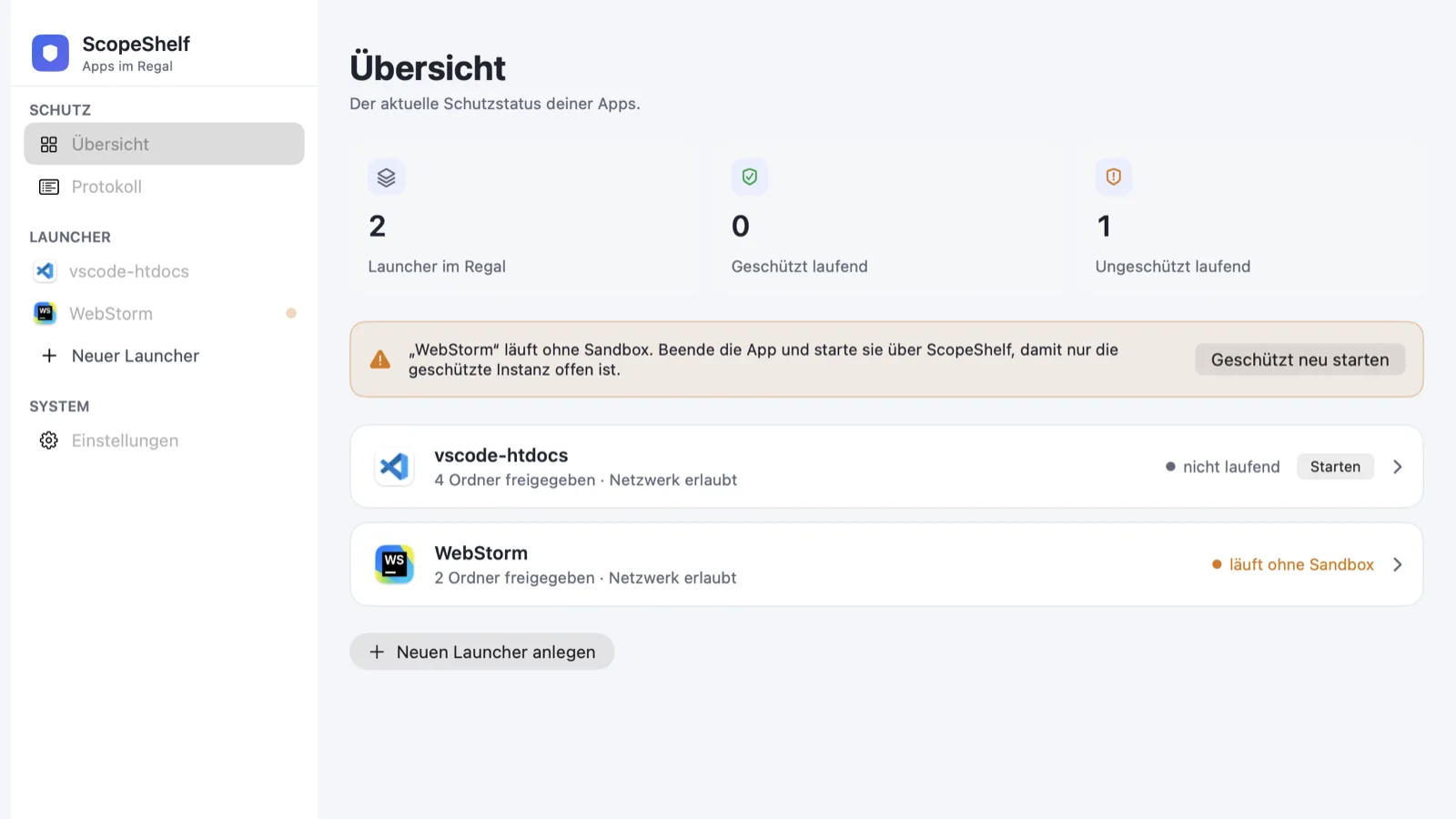
Real screens from the shipping app — German UI, because that's how it ships. Every launcher shows exactly what its app can reach.
The shelf at a glance: every launcher, its running state, and a warning the moment an app runs without its sandbox.
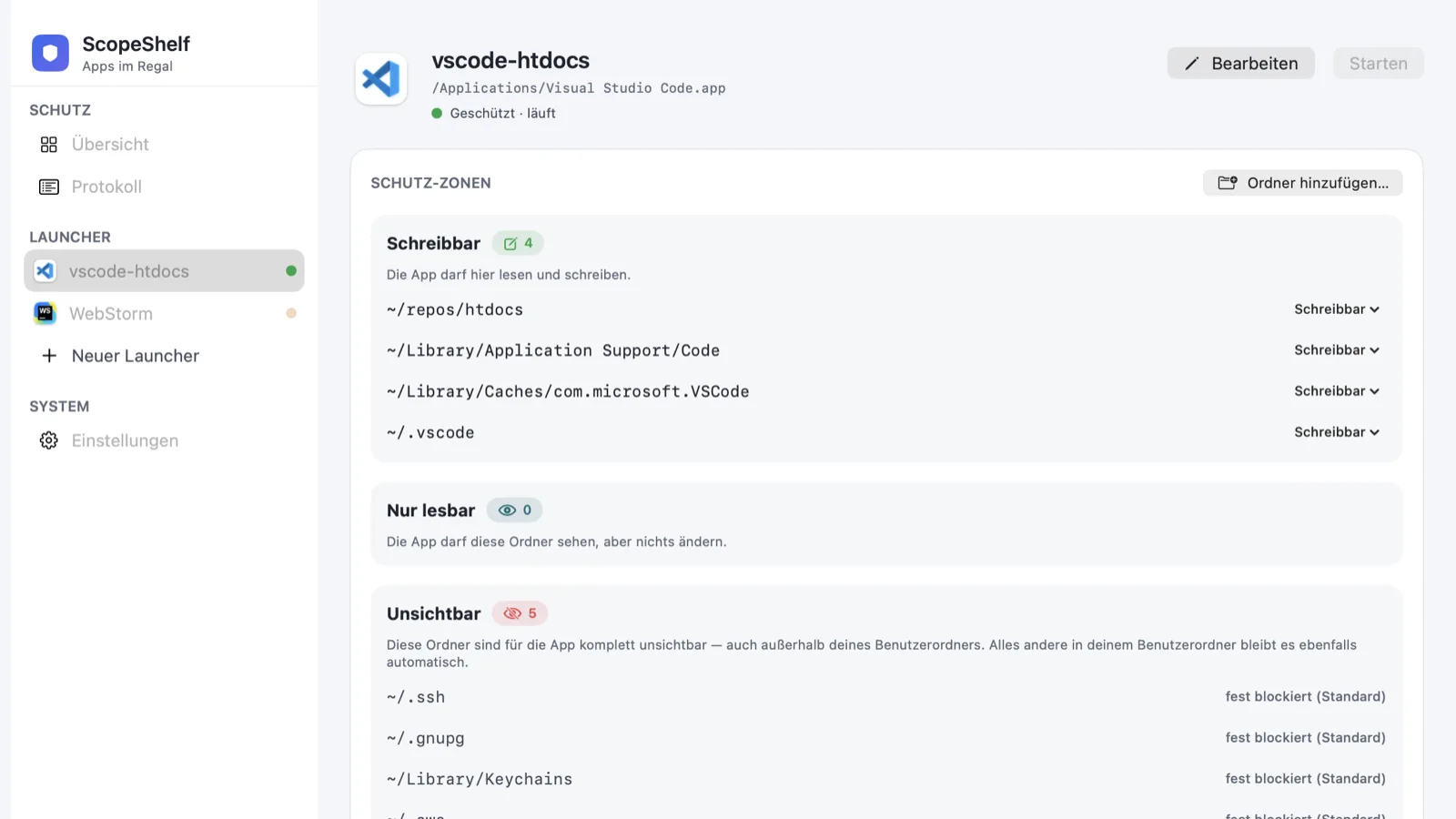
Three protection zones per launcher: writable, read-only, invisible — plus a per-app network switch.
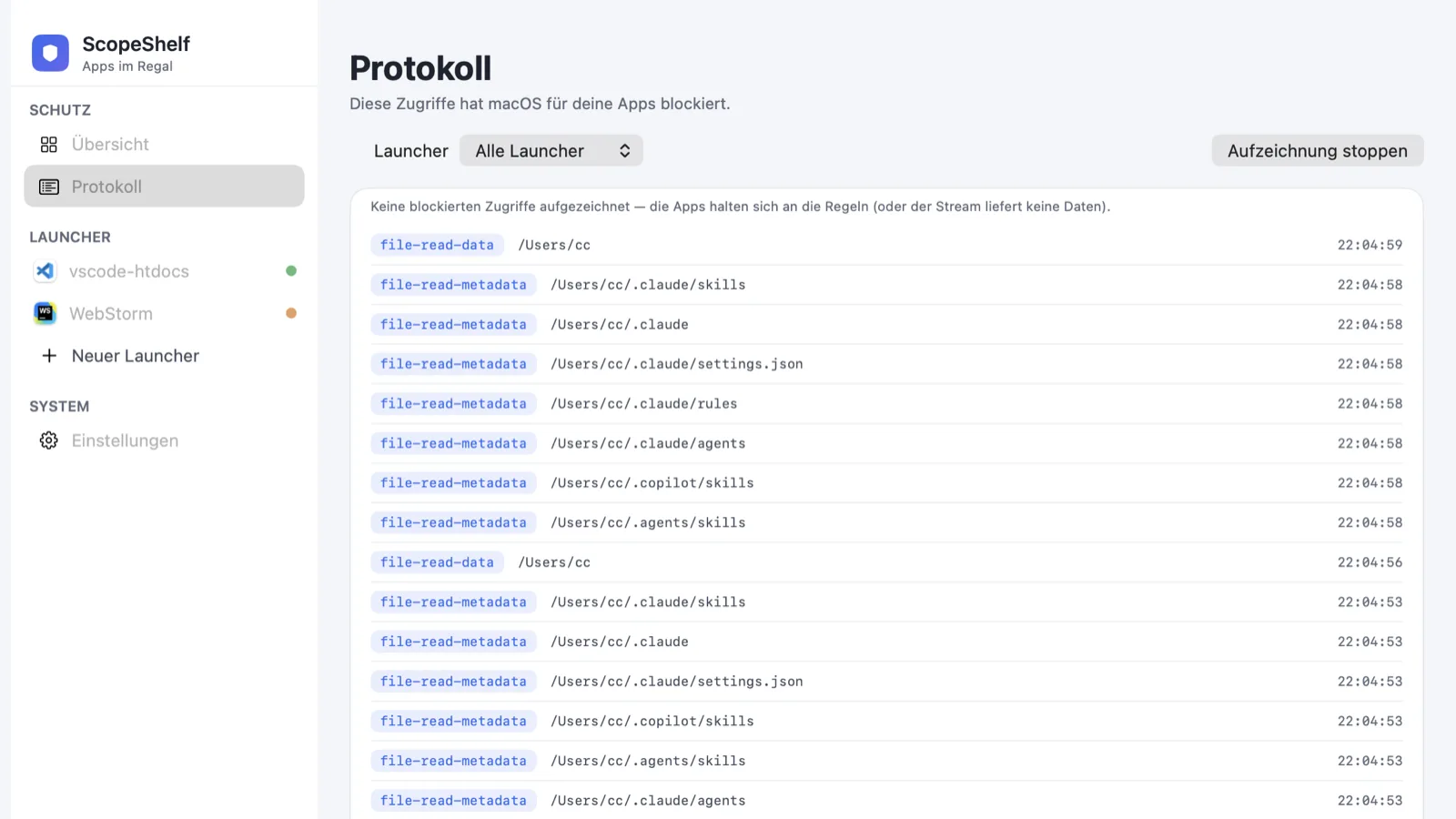
The live audit log: which operation, which path, how often macOS said no. Proof beats promises.
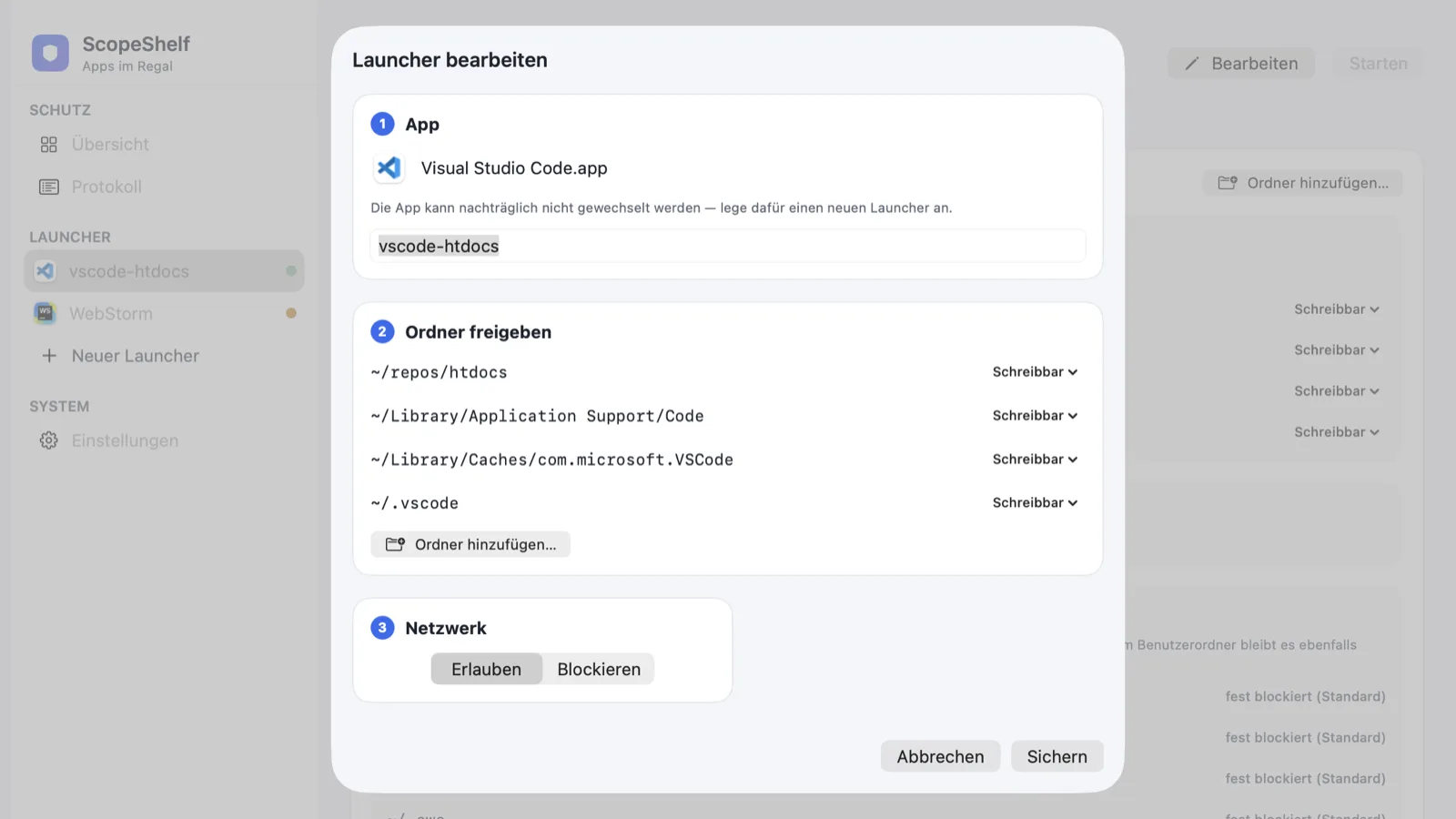
A new launcher in three steps: pick the app, confirm the suggested folders, set the network switch.
Real screenshots from the shipping app.
Why ScopeShelf exists
A while back I downloaded a small utility — closed source, from a vendor I'd never heard of, solving exactly my problem. Before double-clicking, I caught myself thinking: the moment this thing launches, it can read my entire home folder. SSH keys, cloud credentials, client projects. With my full user rights, no questions asked.
The irony is that macOS has shipped the answer since 2007: Seatbelt, the same kernel sandbox Apple uses for its own apps. sandbox-exec sits in /usr/bin on every Mac. But writing Seatbelt profiles by hand is tedious, the syntax is unforgiving, and one rule in the wrong order silently breaks the whole thing. So I wrote one profile, then a generator, then a GUI.
That became ScopeShelf. My apps live on a shelf now, each with exactly the folders I granted — and when one of them tries something I didn't allow, macOS blocks it and my audit log shows me it tried. I still use that little utility. It just can't read my life anymore.
— Christof, builder of ScopeShelf
Features
ScopeShelf does exactly one thing: it decides what each app can reach. Everything below serves that.
Writable, read-only, invisible — per launcher, per folder. Read-only is enforced by real deny file-write* rules, not by politeness.
~/.ssh, ~/.gnupg, ~/Library/Keychains, ~/.aws and ~/.config/gcloud are invisible to every launcher before you grant anything.
One switch adds deny network-outbound. The app keeps running — it just can't send anything anywhere.
Start a recording and watch macOS work: which operation, which path, how often. Proof beats promises.
Turn any launcher into a small clickable app for your Dock. Double-click, sandboxed — ScopeShelf doesn't need to be open.
The menu bar extra shows which watched apps are running protected — and warns you when one is running without its sandbox.
scopeshelf run, dry, add, presets — plus a .scopeshelf file per project directory. Scriptable, diffable, yours.
VS Code, Cursor, Windsurf, WebStorm and iTerm ship with their known data folders. One command, sensible sandbox.
How it works
No kernel extension, no helper daemon, no cloud. ScopeShelf renders a Seatbelt profile per launcher and starts the app through sandbox-exec — the enforcement is macOS itself, and it keeps working when ScopeShelf is closed.
$ scopeshelf dry "VS Code"
(version 1)
(allow default)                          ; system paths stay usable
(deny file-read* file-write* (subpath "/Users/christof"))   ; your home: invisible
(allow file-read* file-write* (subpath "/Users/christof/Projects/work"))  ; granted: writable
(allow file-read* (subpath "/Users/christof/Documents"))
(deny file-write* (subpath "/Users/christof/Documents"))    ; granted: read-only
(deny file-read* (subpath "/Users/christof/.ssh"))          ; always blocked
(deny network-outbound)                  ; no network for this app
This is the actual profile, abridged. Rule order matters — ScopeShelf's renderer gets it right every time.
Security
ScopeShelf doesn't intercept anything itself. It writes rules; macOS enforces them. That distinction is the whole point.
Seatbelt rules are evaluated by the macOS kernel. The sandboxed app cannot switch them off — and neither can a bug inside it.
„Invisible" folders get real deny rules. The app can't read them, can't write them, can't even see they exist.
Read-only folders receive explicit deny file-write* rules. Open them, yes. Modify them, no.
The live status checks each running process with the system's own sandbox_check. If ScopeShelf says „protected", macOS confirmed it.
If the protection state of a process can't be determined, ScopeShelf says exactly that — it never claims a protection it can't verify.
No kext, no launchd daemon, no root privileges. ScopeShelf composes tools your Mac already has — and removes nothing when you uninstall it.
Privacy
We don't know who you are, and we like it that way.
No analytics SDK, no crash reporting you didn't ask for, no usage metrics. The app makes no network connections of its own.
Launchers, profiles and audit logs live in your user folder. There is no ScopeShelf cloud to leak, breach or subpoena.
You download the app and it runs. No sign-up, no email verification, no password to forget.
Polar.sh is our merchant of record. They process the payment; we receive an email address for your license. Nothing else changes hands.
Pricing
One payment, no subscription. Sold by Christof Müller (Switzerland) via Polar.sh as merchant of record — VAT handled properly, invoice included.
For developers, freelancers and anyone who installs software they don't fully trust.
Before you buy: ScopeShelf is currently ad-hoc signed — no Apple Developer ID, no notarization yet. Gatekeeper will warn on first launch; you open the app via right-click → Open (or System Settings → Privacy & Security). The app runs perfectly fine on macOS 14+ — we just want you to know before checkout, not after. Also good to know: apps that already ship Apple's own App Sandbox can't be wrapped; ScopeShelf detects them and tells you.
Honest expectations
Please read this before you buy. It saves both of us a refund.
Frequently asked
Yes: 7 days, full features, no credit card, no account. Download, sandbox your first app, decide.
14 days, money-back, no questions asked. Email hello@scopeshelf.app from the address you bought with.
Every 1.x update is free, for as long as the OS allows. A future v2 would be an optional paid upgrade — your v1 keeps working either way.
The warning is about us, not about the app: ScopeShelf is ad-hoc signed, without an Apple Developer ID so far. Open it via right-click → Open. It's a warning about a missing certificate fee, not about hidden behavior — the app makes no network connections of its own, sandboxed or not.
Apps signed with Apple's own App Sandbox can't be nested inside another sandbox — macOS simply refuses. ScopeShelf detects this when you pick the app and tells you before you buy a launcher for nothing.
Yes. ScopeShelf handles their helper processes and the inner Chromium sandbox (--no-sandbox), so the outer Seatbelt rules apply cleanly to the whole app.
Yes — scopeshelf with list, run, dry, add, remove, init and presets. Extras: --env for environment variables, a :ro suffix for read-only folders, and .scopeshelf config files per project.
macOS 14 Sonoma or later, on Apple Silicon and Intel.
deny network-outbound blocks all outbound connections for the app and its child processes — TCP, UDP, the lot. It's deliberately all-or-nothing per launcher, not per-host filtering; for that, a connection-level firewall remains the right tool.
It simply doesn't see it — as if the folder didn't exist. Most apps cope fine. If one misbehaves, the audit log shows exactly which access was blocked, and granting that folder takes one click.
Talk to us
We read every message and usually reply within a working day.
From the same workshop

Our local-first network scanner: every device on your LAN, open ports, a security report and presence alerts. Same principles: one-time purchase, no account, no telemetry.

Our local-first server cockpit: SSH inventory, Docker, TLS and uptime monitoring, AI log triage — with your own key. Same principles: one-time purchase, no account, no telemetry.